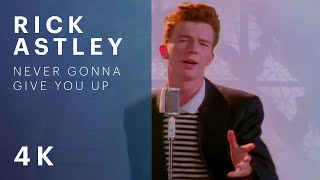











YouTube Thumbnail Maker for Clicks, Not Guesswork
Describe your video, add a photo of yourself or a reference, and Thumbnail Studio creates bold, readable YouTube thumbnails at the exact 1280×720 size — plus vertical sizes for Shorts.
No credit card required · 5 free starter credits

Why creators use the YouTube Thumbnail Studio
Prompt-first
One box: describe the video, choose a style and generate several variations.
Your face, your brand
Add up to a few reference images so thumbnails match your look and colours.
Right size every time
Exports at 1280×720 by default with vertical options for Shorts.
Templates & history
Browse proven templates and download any past thumbnail.
How to use the YouTube Thumbnail Studio
- 1
Describe the video
Type the topic, hook text and mood.
- 2
Add references
Upload a selfie, product shot or a YouTube URL for inspiration.
- 3
Generate & download
Pick the strongest variation and download it ready for YouTube.
YouTube Thumbnail Studio FAQ
What size are YouTube thumbnails?
YouTube recommends 1280×720 pixels (16:9). Thumbnail Studio exports that size by default.
Can I put my own face in the thumbnail?
Yes. Upload a reference photo and it is used to match your look.
Can I download a competitor's thumbnail for reference?
Use the free YouTube Thumbnail Downloader, then add it as a reference image.
Related YouTube tools
YouTube Channel Branding Generator
Create a YouTube banner (2560×1440 with 1546×423 safe area) and an 800×800 channel logo that match your style. Preview on desktop, TV and mobile, then download.
YouTube Title Generator
Generate click-worthy YouTube titles from your topic and target keyword. Each title is scored for length, keyword placement and clarity, ready to copy.
YouTube Video Optimizer
Find your weakest YouTube videos by SEO score and fix them. Get better titles, descriptions and tags to copy into YouTube Studio and revive old uploads.
Start growing your channel today
Join thousands of creators using TubeDoe to plan, create and rank faster.